
Microsoft Fabric Tutorial: Building a Modern Data Lakehouse in 2026


What Is a Microsoft Fabric Data Lakehouse?
A Microsoft Fabric data lakehouse is a unified analytics architecture built on Microsoft Fabric's SaaS platform that combines the flexible, schema-on-read storage of a data lake with the structured querying and ACID transaction capabilities of a data warehouse. At its core, it leverages OneLake — Fabric's single logical data lake — and open table formats like Delta Lake to give data teams the best of both paradigms without the integration overhead of maintaining two separate systems. For mid-size organisations modernising their data stack in 2026, it represents one of the most compelling all-in-one platforms currently available from a major cloud provider.
If you are newer to the broader lakehouse concept, our post on data lakehouse architecture and Apache Iceberg provides a solid foundation before diving into the Fabric-specific implementation below.
Why the Microsoft Fabric Data Lakehouse Matters in 2026
From a practical standpoint, the Microsoft Fabric data lakehouse matters in 2026 for several converging reasons:
- Cost consolidation: Organisations running separate Azure Data Lake Storage (ADLS), Azure Synapse, and Power BI Premium capacities are consolidating onto a single Fabric capacity SKU, often realising 20–35% infrastructure cost reductions based on our experience with mid-size clients.
- Simplified governance: Microsoft Purview is natively integrated into Fabric, meaning data cataloguing, lineage, and sensitivity labelling happen at the platform level rather than through bolt-on tooling. This directly supports a mature data governance framework.
- Open format interoperability: Delta Lake as the default storage format means your data assets are not locked into proprietary storage. Teams using dbt, Spark, or even Databricks can read the same OneLake tables — a critical consideration we explore in our Snowflake vs Databricks comparison.
- AI-ready architecture: Microsoft Copilot capabilities are embedded across Fabric workloads, enabling natural-language querying against lakehouse tables, automated pipeline suggestions, and anomaly detection — all without leaving the platform.
The bottom line: if your organisation is running on Azure and evaluating a modern data stack in 2026, Microsoft Fabric's lakehouse pattern deserves serious architectural consideration.
How Does a Microsoft Fabric Data Lakehouse Work? Core Architecture Breakdown
Understanding how Fabric's lakehouse operates requires unpacking several interlocking components. Rather than treating it as a single product, think of the Microsoft Fabric data lakehouse as an orchestrated set of services unified by OneLake and governed through a shared capacity model.
-
OneLake: The Foundation
OneLake is the single, tenant-wide data lake that underpins every Fabric workload. Every workspace in your Fabric tenant automatically gets storage in OneLake, using a hierarchical namespace structured as Tenant → Workspace → Lakehouse → Files / Tables. Critically, OneLake uses shortcuts — a virtualisation mechanism that lets you reference data in ADLS Gen2, Amazon S3, or Google Cloud Storage without physically copying it. This means a financial services client can maintain raw transaction data in an existing ADLS account and reference it directly inside a Fabric lakehouse as a shortcut, eliminating the dreaded "copy everything first" migration tax.
Microsoft's documentation states that OneLake is built on ADLS Gen2 infrastructure and is fully POSIX-compliant, meaning existing Spark workloads and tools that target ADLS paths can be re-pointed to OneLake URIs with minimal refactoring.
-
The Lakehouse Item and Delta Tables
Within Fabric, a Lakehouse item has two logical zones: the Files section (raw, unmanaged files in any format) and the Tables section (Delta Lake managed tables with full schema enforcement). When you write a Spark notebook or dataflow that lands data into the Tables zone, Fabric automatically registers those Delta tables in the built-in Lakehouse SQL Analytics Endpoint — a read-only T-SQL interface that makes every managed table instantly queryable without any additional configuration.
This dual-zone pattern maps naturally to the Medallion Architecture: raw ingested files land in the Files zone (Bronze), transformations promote data into managed Delta tables (Silver and Gold). For teams already practising medallion layering with dbt and Snowflake (see our guide on dbt + Snowflake medallion implementation), the conceptual model is immediately familiar, even though the execution layer differs.
Compute: Spark Notebooks, Pipelines, and Dataflows Gen2
Fabric offers three primary compute paths for building lakehouse pipelines:
- Spark Notebooks & Spark Job Definitions: Full PySpark / Scala / SQL support using Fabric's managed Spark runtime (currently Spark 3.5 as of mid-2026). Ideal for large-scale transformations, ML feature engineering, and complex ELT patterns. See our ELT vs ETL guide for context on when ELT is the right pattern.
- Data Factory Pipelines: Low-code orchestration pipelines with 150+ connectors, supporting copy activities, data flows, and notebook invocation. The Activity-based model will feel familiar to anyone who has used Azure Data Factory.
- Dataflows Gen2: Power Query-based visual transformations that land data directly into OneLake or Fabric Warehouse tables. Best suited for business analysts and lighter transformation workloads.
A Real-World Implementation Example
We created OneLake shortcuts pointing to their existing ADLS Gen2 containers (zero data movement for Bronze), built Silver-layer Delta tables using Spark notebooks running scheduled as Fabric Job Definitions, and created a Gold-layer semantic model using a Fabric Warehouse connected to the SQL Analytics Endpoint. The key challenge was partition strategy: their transaction table had 4.2 billion rows, and naive Delta writes were causing excessive small-file accumulation. We resolved this by implementing a Z-ORDER clustering on the transaction_date and account_id columns, combined with a weekly OPTIMIZE job, reducing average query times on the Gold layer from 38 seconds to under 4 seconds.
The relevant Spark SQL for the optimisation step looked like this:
-
-- Run within a Fabric Spark Notebook (Spark 3.5, Delta Lake 3.x)
OPTIMIZE silver.transactions
ZORDER BY (transaction_date, account_id);-- Vacuum old snapshots older than 7 days (adjust retention per governance policy)
VACUUM silver.transactions RETAIN 168 HOURS;
This pattern — shortcuts for Bronze, managed Delta for Silver/Gold, OPTIMIZE on a schedule — is what we now treat as our baseline Fabric lakehouse blueprint for transactional workloads. It also directly informed the data quality framework we established for that client, since Delta’s transaction log gave us full row-level audit capability.
Microsoft Fabric Data Lakehouse vs Competing Platforms: How Does It Compare?
Before committing to a platform, it is worth understanding where the Microsoft Fabric data lakehouse stands relative to alternatives. The table below reflects our assessment as of mid-2026, based on hands-on implementation experience and publicly available vendor documentation.
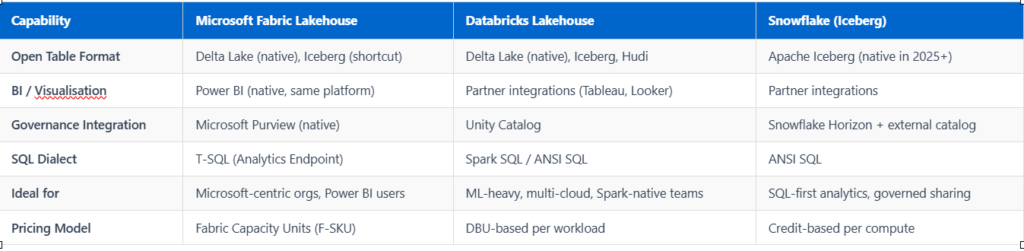
In our experience, organisations already invested in the Microsoft 365 and Azure ecosystem typically see the fastest time-to-value with Fabric. Teams with heavy Spark ML workloads or multi-cloud mandates may find Databricks a more natural fit — a trade-off we examine in depth in our Snowflake vs Databricks comparison. If your primary concern is governed data sharing across organisational boundaries, the principles from our data mesh architecture guide are also worth considering before locking into a single platform topology.
Common Mistakes and Best Practices When Building a Microsoft Fabric Data Lakehouse
Based on our implementation engagements and a review of common patterns in the Fabric community, the following mistakes consistently surface — along with the practices we recommend to avoid them.
Mistake 1: Treating OneLake as a Dump Zone
Many teams land raw data into the Files zone and never promote it to managed Delta tables, losing all the benefits of ACID transactions, schema enforcement, and the SQL Analytics Endpoint. Best practice: Define explicit promotion criteria for when data moves from Files (Bronze) to Delta Tables (Silver/Gold), and enforce this via pipeline contracts. Our post on data contracts for producer-consumer teams outlines a governance model that works well here.
Mistake 2: Ignoring Workspace and Capacity Topology
Fabric’s shared capacity model means all workloads in a capacity compete for the same Capacity Units. Running an unoptimised Spark job during business hours can spike CU consumption and throttle Power BI report queries. Best practice: Separate production lakehouse workloads and Power BI semantic models into dedicated workspaces, and schedule heavy Spark jobs during off-peak windows using Fabric’s built-in scheduler.
Mistake 3: Neglecting Data Quality at Ingestion
Delta Lake’s ACID guarantees prevent corrupt writes but do not validate business logic. We have seen clients ingest months of malformed data into Silver tables simply because no schema evolution or constraint policy was in place. Best practice: Implement CONSTRAINT checks on critical Delta tables and establish a systematic data quality framework with observable metrics before scaling ingestion pipelines.
Mistake 4: Skipping Medallion Layer Discipline
Jumping straight from raw ingestion to a Gold-layer report table, skipping Silver, makes transformations brittle and reusability near-impossible. The three-layer medallion architecture is well-supported in Fabric and should be the default starting point, not an afterthought.
Mistake 5: Under-investing in Governance from Day One
Fabric’s Purview integration is only as useful as the policies you define. Sensitivity labels, data lineage scanning, and workspace access policies need to be configured before data volumes scale — not retrofitted later. This is especially true for regulated industries; our guide on data governance for financial services outlines a practical starting framework.
How DataKrypton Helps You Build a Microsoft Fabric Data Lakehouse
At DataKrypton, we have helped mid-size organisations across Canada and the United States design and implement Microsoft Fabric data lakehouses that are production-ready, governed, and aligned with their broader data strategy — not just proof-of-concept deployments that stall before going live.
Our typical Fabric engagement covers:
- Architecture assessment: Evaluating your existing Azure, Power BI, and data infrastructure to define the right OneLake topology, workspace structure, and capacity sizing for your workload mix.
- Medallion pipeline build: Designing and implementing Bronze → Silver → Gold pipelines using Spark notebooks and Data Factory, with Delta optimisation patterns appropriate to your data volumes.
- Governance configuration: Connecting Microsoft Purview, defining sensitivity labels, configuring row-level security on semantic models, and establishing data contract standards for producer teams.
- Team enablement: Hands-on training for your data engineering and analytics teams so they can own and evolve the platform after we hand off.
Whether you are starting from scratch or migrating an existing Synapse or Databricks workload, we bring the technical depth and cross-industry experience to get your lakehouse production-ready faster and with fewer costly false starts.
About Author:

Debajyoti Kar is the Founder and Principal Data Consultant at DataKrypton AI.
He holds Snowflake SnowPro Core and dbt Developer certifications and has led data engineering and governance
engagements for clients across financial services, retail, and healthcare in Canada and the United States.
A Fabric Lakehouse stores data in open Delta Lake format on OneLake and exposes it through both a Spark compute engine and a read-only T-SQL SQL Analytics Endpoint — making it ideal for mixed ELT and exploratory workloads. A Fabric Warehouse is a fully managed, read-write T-SQL data warehouse optimised for structured, relational workloads where SQL-first teams need full DML support including INSERT, UPDATE, and DELETE. In most architectures, the Lakehouse handles raw and transformed layers while the Warehouse serves curated Gold-layer data to BI consumers.
Yes, in most cases it is — provided the organisation already operates in the Microsoft 365 or Azure ecosystem and has at least a part-time data engineering resource. The Fabric F2 or F4 capacity SKUs are cost-accessible for mid-size teams, and the consolidation of storage, compute, and BI onto a single platform can significantly reduce operational overhead. That said, smaller organisations without existing Azure infrastructure may find the initial capacity commitment and learning curve a barrier compared to simpler SaaS analytics tools.
As of mid-2026, dbt supports Microsoft Fabric through the dbt-fabric adapter, which targets the Fabric Warehouse’s T-SQL endpoint. For Lakehouse-specific transformations using the SQL Analytics Endpoint, compatibility is more limited due to its read-only nature — teams typically use Spark notebooks or Dataflows Gen2 for Lakehouse-layer transformations and reserve dbt for Gold-layer Warehouse models. Our analytics engineering with dbt guide covers adapter selection in more detail.
OneLake supports shortcuts — virtual references to external storage locations including Amazon S3, Google Cloud Storage, and ADLS Gen2 — without physically copying the data into Fabric storage. This means you can query data residing in AWS or GCP directly from a Fabric Lakehouse using Spark or the SQL Analytics Endpoint, making it practical for organisations with multi-cloud data estates. Shortcuts respect the source storage’s access controls in addition to Fabric’s own permission model, though latency for cross-cloud queries is typically higher than for native OneLake data.
Our Latest Blog

Stay Ahead with Data Insights
Be the first to know about new frameworks, best practices, and real-world use cases from our data experts.
Subscribe for Data Wisdom
Primary sources and technical references
Use these first-party standards and platform references to validate implementation details and current capabilities.